(Auszug aus der Pressemitteilung)
At the start of January, the US Federal Bureau of Investigation (FBI) issued a warning against cyber attacks organised by North Korean cybercriminals who used fake QR codes to trick users into obtaining personal information. According to cybersecurity experts, similar attacks, also known as “quishing”, are on the rise not only in the US but in other countries, as cybercriminals look for new ways to profit.
Quishg (QR code phishing) is a phishing technique where cybercriminals try to trick users into scanning QR codes that lead to malicious websites. Organisations in several countries have issued warnings that bad actors place these QR codes on top of legitimate ones in public places such as kiosks, restaurants, or parking meters.
For example, last year, UK government institutions have warned users of fake QR stickers on parking machines, with victims being sent to spoofed payment pages. Meanwhile, the US Federal Trade Commission issued a similar warning about unexpected packages containing QR codes that led to phishing websites.
Such fake QR codes can also be shared online. For example, the FBI said that a North Korean state-sponsored cybercriminal group, called Kimusky, targeted employees of organizations by embedding malicious QR codes in an email. In one such instance, a QR code was presented as a way to download additional information.
According to cybersecurity experts at Planet VPN, a free virtual private network (VPN) provider, no matter where a fake QR code is placed, the scheme is similar. After scanning it, a user is often forwarded to a fake phishing website mimicking a legitimate one, such as a restaurant’s website, where cybercriminals may try to charge a user’s credit card.
According to Konstantin Levinzon, co-founder of Planet VPN, such scams can lead not only to financial losses but also to compromised devices.
“Quishing is phishing–just in a different wrapper. A QR code can lower people’s guard because this technology became ubiquitous only during the pandemic, and the threat still isn’t as widely recognized. It also shifts the “risky click” from a visible link to a quick scan, making the danger easier to miss. Attackers are refining these tactics every year and constantly finding new ways to trick users,” he says.
According to Levinzon, one reason why cybercriminals may favour QR codes in emails instead of regular phishing emails is that QR codes often bypass anti-phishing and scam filters, because these often analyze only text and links, but don’t analyze images.
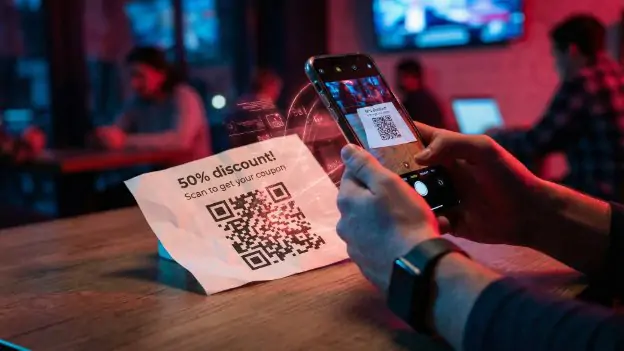
Fake QR code at a bar. (Source: Planet VPN)
And even if anti-spam filters in emails are equipped with QR code detection, cybercriminals often find new ways to bypass them, for example, by making QR codes in different colors.
Cybersecurity researchers at Proofpoint estimate that during the first half of last year, there were 4,2 million QR code-related threats. However, Levinzon says that the number is likely higher because many QR code scams are undetected.
When it comes to protecting against the growing threat, users are advised to be more deliberate about when and why they scan a QR code. If after scanning a QR code, a person is forwarded to a website that asks for payment or log-in details, this is a real warning sign.
Meanwhile, if a QR code is sent from an unknown sender via email, Levinzon advises contacting the sender directly before entering login credentials or downloading files.
“We recommend applying the same logic everywhere: stay skeptical whether you receive a message from a coworker or on your personal social media account. However, vigilance is only part of the story. To maximize security, users also need basic safeguards – use a VPN on public Wi-Fi, install updates promptly, use strong passwords, and enable multi-factor authentication on all accounts,” he says.




Neueste Kommentare
27. Januar 2026
27. Januar 2026
27. Januar 2026
24. Januar 2026
21. Januar 2026
20. Januar 2026